Skip to content

Cocheno

  • Favourite
  • Visio Stencil´s
  • Quizzes
    • Interview
  • Packet DNA
  • Labs
  • IP Express Consulting
  • Tools
  • Playlists
  • About me
  • Contact me

Diagram

How to unlock cursor on Visio
29 de February de 2016 by Ruben

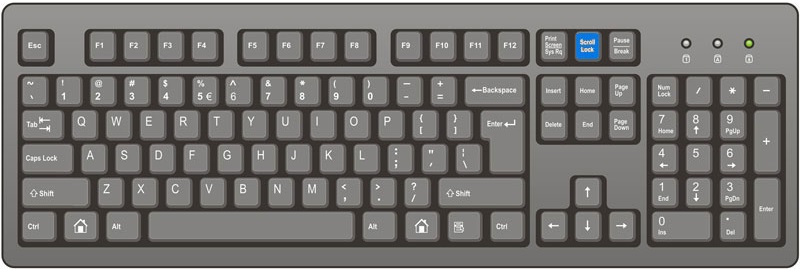
This happens time to time, so keep calm if you can’t move objects on your Network diagram, you just need to press Scroll Lock button again to turn it off! Look to the keyboard below to know where it is located. Now you can finish your diagram!

Categories General, Tools Tags Visio, Diagram, Scroll-lock Leave a comment

Search

Powered By

Recent Posts

  • How to restore terminals of last session in VSCode?
  • Cisco ESA Secure Email Upgrade from 13.5 to 14.2 Release
  • Cisco Firepower Forbidden- you don’t have permission to access
  • Windows 802.1X supplicant debugging
  • AnyConnect Package on the secure gateway could not be located

Poll

[poll id=”6″]

[poll id=”2″]
[poll id=”3″]
[poll id=”4″]
[poll id=”5″]

Categories

  • Multicast (1)
  • QoS (1)
  • Arista (1)
  • Fortinet (1)
  • Wireless (2)
  • L2VPN (1)
  • IPsec (1)
  • Cloud (7)
  • Palo Alto Networks (2)
  • SDN and Automation (5)
  • AWS (1)
  • Azure (1)
  • xOps (3)
  • General (113)
  • News (91)
  • Events (29)
  • Cisco (185)
  • Juniper (75)
  • CheckPoint (20)
  • F5 (11)
  • VMware (19)
  • Nortel/Avaya (6)
  • Brocade (6)
  • Dell (3)
  • HP (2)
  • Training (135)
  • Labs (11)
  • Linux (10)
  • Windows (5)
  • Services (3)
  • Data Center (18)
  • Switching (7)
  • Routing (9)
  • Security (37)
  • MPLS (1)
  • OSPF (1)
  • NAT (2)
  • Tools (17)
  • Misc (14)

Tags

8.0 ASA Backup Blocked CCIE Webinar Seminário CCT Certificacao Cisco ASA Firewall Cisco CCNPwebinar Cisco Evento Citrix Config Error Esmtp Ethtool Ethtool FullDuplex Speed Evento Fail Firewall Hidden Hp Inovação Inspection Interop Ip Ipsec IPv6 Lan2lan Load Memory Mysql Openflow Outros Password Remote access Smtp Spam Speed Tftp Tls Training Verificar Virtualizacao Vpn Xen-server
© 2025 Cocheno • Built with GeneratePress
We use cookies to ensure that we give you the best experience on our website. If you continue to use this site we will assume that you are happy with it.